Building a RAG Chatbot for My LLM Course
In my LLM course I learned about Retrieval Augmented Generation (RAG) in theory and decided that I want to create a project in order to fully understand how it works and how it would benefit me in the future.
This work was the basis of my personal chatbots' RAG capability, press the red message circle at the bottom and try it yourself. :)
The Problem: LLM Hallucinations & Context
In class, we discussed that while LLMs are powerful, they are restricted by limited context windows and static training data. They simply don't have access to my lecture notes or project files. This is exactly the problem that the RAG architecture solves.
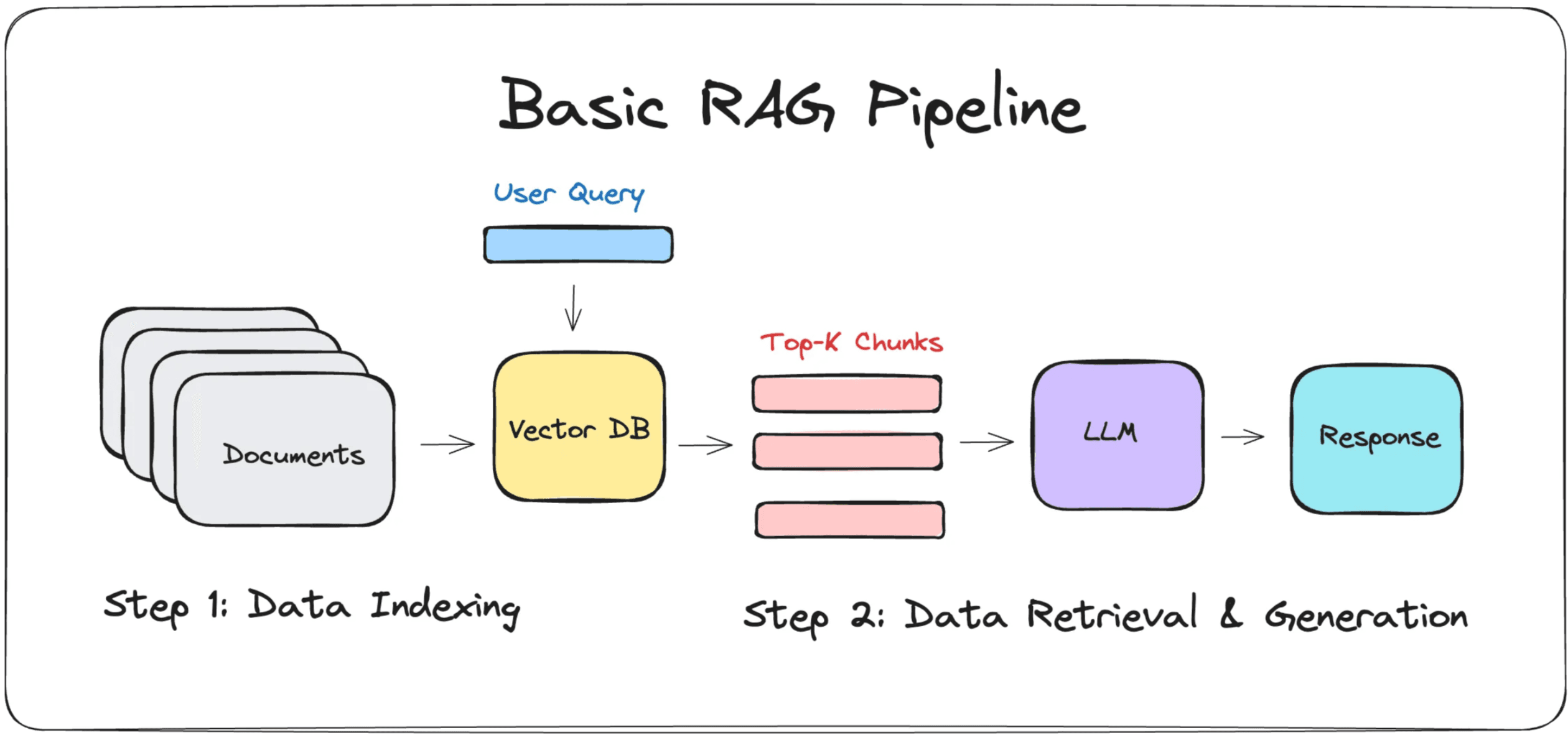 This basically sums up how RAG pipeline functions and this was my base as the idea.
Tools
For this project, I chose these tools to get to know the basics:
LLM: Google Gemini 2.5 Flash-Lite (Fast response, high limit rates) Vector Database: ChromaDB (VectorDB with built in embedding features) Embeddings: all-MiniLM-L6-v2 (Lightweight embedding model for local embedding) UI: Gradio (for a quick and simple interactive web interface)
Here is the end product:
Understanding the Architecture
1. The Ingestion Pipeline
Before the system can answer anything, it needs to process the raw data.
Chunking: The system reads documents (.pdf, .md, etc.) and splits them into smaller segments (e.g., 512 tokens). This is crucial because we cannot exceed the embedding model's input limit (for our case it is 256 tokens) or the LLM's context window (in this case its 1 Million, which is really hard to hit).
Embedding Generation: Each chunk is passed through the local Sentence Transformer (all-MiniLM-L6-v2) model. This model converts the text into a dense vector (a long list of numbers) that represents the semantic meaning of that chunk.
2. Vector Storage & Retrieval
This is where ChromaDB comes in. Storage: The generated vectors are stored in ChromaDB, acting as our knowledge base.
Query Processing: When a user asks a question (e.g., "What are the project requirements?"), the system doesn't just look for keywords. It converts the user's question into its own vector using the same embedding model.
Similarity Search: ChromaDB calculates the mathematical distance between the Question Vector and the stored Document Vectors.
Retrieval: The system fetches the top K chunks (e.g., the 3 most similar chunks) that have the shortest distance to the question vector.
3. Prompt Augmentation & Generation (The "AG" in RAG)
This is the final step where the retrieved context meets the LLM.
Context Injection: The system dynamically constructs a prompt. It takes the retrieved text chunks and injects them into a strict template, effectively saying: "Using ONLY the following context, answer the user's question."
Generation: This augmented prompt is sent to the Google Gemini API. Because the model now has the specific facts in its context window, it can answer the question accurately without hallucinating, grounding its response in my local data.
What I Have Learnt
Overall the logic may be simple but the importance is high for RAG. It effectively handles cases where you need data privacy—sending only relevant semantic chunks to the provider rather than your entire private dataset—and solves the limitation of restricted context windows. This project was a great experience, and I have learned a ton about how RAG systems actually operate.